







What you'll be able to do
- Build responsive front-ends with HTML, CSS, JavaScript, and Bootstrap
- Write solid Python: data structures, OOP, files, and HTTP APIs
- Build database-backed Django apps with auth, forms, and the admin
- Expose REST APIs with Django REST Framework
- Integrate payments and deploy a full-stack app to the cloud
Before you start
- A laptop that can run Python and a code editor (VS Code/PyCharm)
- Basic comfort using a computer; no prior coding required
- Willingness to practice daily through the cohort
Tools & technologies
The syllabus
Introduction to Web Technologies & HTML Basics
Understand how the web works and write your first HTML pages.
- How the web works: client–server, DNS, HTTP/HTTPS
- Browsers and web servers
- Set up your dev environment: editor, IDE, DevTools
- HTML document structure, tags, and attributes
- Build your first page: headings, paragraphs, lists, images
- Day 1 checkpoint
Advanced HTML & Semantic HTML
Build forms, embed multimedia, and write accessible, semantic markup.
- Forms and form controls: inputs, buttons, checkboxes, radios
- Multimedia: audio, video, and embedding
- Tables and structuring data
- Semantic HTML, accessibility, and SEO-friendly markup
- Project 1: Personal Bio Page
- Day 2 checkpoint
Introduction to CSS & Styling Basics
Style HTML with selectors, text properties, and the box model.
- Three ways to add CSS: inline, internal, external
- Selectors, properties, and values
- Styling text: fonts, colors, and alignment
- The box model: margin, padding, border, content
- Day 3 checkpoint
Advanced CSS for Layouts
Lay out responsive pages with Flexbox, Grid, positioning, and media queries.
- Flexbox fundamentals
- CSS Grid fundamentals
- Float, clear, and positioning (relative/absolute/fixed/sticky)
- Responsive design with media queries
- Project 2: Responsive Product Landing Page
- Day 4 checkpoint
CSS Transitions, Animations & Pseudo-Classes
Add motion and interactive states with transitions, keyframes, and pseudo-classes.
- Transitions for smooth animations
- Keyframes and custom animations
- Pseudo-classes and pseudo-elements: :hover, ::before, ::after
- Day 5 checkpoint
JavaScript Basics
Write core JavaScript and manipulate the DOM.
- Variables, data types, and operators
- Functions, conditionals, and loops
- DOM manipulation: accessing and modifying elements
- Project 3: Interactive Quiz
- Day 6 checkpoint
Advanced JavaScript & Event Handling
Handle events and validate forms with JavaScript and regex.
- Arrays, objects, and functions in depth
- Event listeners: click, hover, keypress
- Form validation and regular expressions
- Day 7 checkpoint
Introduction to Bootstrap & Responsive Design
Use the Bootstrap grid to build responsive layouts fast.
- What is Bootstrap and how to set it up (CDN vs local)
- The Bootstrap grid system
- Responsive layouts: breakpoints and column system
- Project 4: Responsive Business Website
- Day 8 checkpoint
Bootstrap Components & Utilities
Build UIs faster with Bootstrap components and utility classes.
- Core components: buttons, cards, forms, alerts
- Navigation bars and dropdowns
- Utility classes: spacing, colors, and responsive helpers
- Day 9 checkpoint
Bootstrap Forms & Modals
Build responsive forms, modals, and carousels with Bootstrap.
- Responsive forms: input groups, form grids, validation styles
- Modals for pop-up content
- Carousels for image and content sliders
- Project 5: Bootstrap Portfolio Website
- Day 10 checkpoint
Integrating JavaScript with Bootstrap
Control and extend Bootstrap components with JavaScript.
- Controlling Bootstrap components with JavaScript (modals, tooltips, dropdowns)
- Event listeners for dynamic Bootstrap interactions
- Day 11 checkpoint
Advanced JavaScript & AJAX
Fetch and display external data dynamically with AJAX and JSON.
- Asynchronous JavaScript and AJAX explained
- Fetching external APIs and working with JSON
- Dynamic content loading without page refresh
- Day 12 checkpoint
Web Development Best Practices
Use Git for version control and optimize web performance.
- Version control with Git and GitHub: clone, commit, push, pull
- Performance: minifying CSS/JS and optimizing assets
- Day 13 checkpoint
Project Deployment & Final Review
Deploy a static site and verify it across browsers and devices.
- Deploying with GitHub Pages and Netlify
- Cross-browser compatibility and responsiveness checks
- Final project preparation and review
- Day 14 checkpoint
Foundation Capstone: Complete Web Application
Plan, build, and present a multi-page responsive web app.
- Capstone brief: a multi-page responsive web app
- Planning and structuring your foundation capstone
- Build and present your foundation web app
Introduction to Python
Install Python, pick an IDE, and write your first scripts.
- Why Python? Installing on Windows, Linux, and Mac
- Writing and running Python scripts; IDEs (IDLE, PyCharm, VS Code)
- Variables, data types, and type casting
- Day 1 checkpoint
Python Operators & Control Structures
Use operators and branch with conditionals.
- Operators: arithmetic, logical, relational, bitwise
- If-else and nested if statements
- Operators and conditionals lab
- Day 2 checkpoint
Loops & Functions
Repeat work with loops and package logic into functions.
- For and while loops; break, continue, pass
- Creating functions and function arguments
- Loops and functions lab
- Day 3 checkpoint
Lists, Tuples, and Dictionaries
Use Python core containers fluently.
- List operations: append, remove, sorting
- Tuples and dictionary basics; dict methods (keys, values, items)
- Data structures lab
- Day 4 checkpoint
Exception Handling & File Handling
Handle errors and read/write files.
- try, except, finally blocks
- Reading and writing files; working with CSV and JSON
- Files and exceptions lab
- Day 5 checkpoint
Object-Oriented Programming (OOP) in Python
Model code with classes and the OOP pillars.
- Classes and objects
- Encapsulation, inheritance, polymorphism
- OOP practice lab
- Day 6 checkpoint
Working with APIs in Python
Call HTTP APIs and parse JSON.
- Making API calls using requests
- Parsing JSON responses
- Mini Project 1: Fetch and display weather data
- Day 7 checkpoint
Setting Up Django
Install Django and scaffold a project.
- Installing Django and creating a project
- The Django folder structure
- Day 8 checkpoint
Django Basics: Models, Views & Templates
Understand MVT and wire up your first views.
- MVC/MVT architecture explained
- Creating Django apps
- URL routing and views
- Day 9 checkpoint
Django Templates & Static Files
Render dynamic templates and serve static assets.
- Passing data to HTML templates
- Using CSS, JavaScript, and Bootstrap in Django
- Day 10 checkpoint
Django Models & Databases
Define models and run CRUD with the ORM.
- Creating and migrating models
- CRUD operations with the Django ORM
- Day 11 checkpoint
Django Forms: Handling User Input
Build and validate Django forms.
- Creating forms in Django
- Validating form data
- Day 12 checkpoint
User Authentication & Session Management
Use Django's auth system for login flows.
- User registration, login, and logout
- Using Django's built-in authentication system
- Day 13 checkpoint
Django Admin Panel Customization
Customize the admin and manage users.
- Adding custom models to the Django admin
- Managing users and permissions
- Mini Project 2: User authentication system
- Day 14 checkpoint
Creating Dynamic Web Pages
Build dynamic routes and use middleware.
- Dynamic routing in Django
- Working with middleware
- Day 15 checkpoint
Handling Forms & File Uploads
Accept and serve uploaded files.
- Uploading images and documents
- Handling media files in Django
- Day 16 checkpoint
Django Signals & Caching
Decouple logic with signals and speed up with caching.
- Using Django signals
- Implementing caching for performance
- Day 17 checkpoint
Django REST Framework (DRF) Basics
Expose REST endpoints with DRF.
- Understanding REST APIs
- Creating API endpoints with DRF
- Day 18 checkpoint
Connecting Django with Frontend Frameworks
Consume a Django API from a JS frontend.
- Fetching API data in React or Vue.js
- Frontend integration lab
- Day 19 checkpoint
Deployment & Cloud Hosting
Deploy a Django project to the cloud.
- Deploying a Django project on Heroku or AWS
- Deployment lab
- Day 20 checkpoint
Building a Blog Application
Build a blog with posts, comments, and auth.
- Creating blog posts and comments
- User authentication for blogs
- Mini Project 3: Blog system with user authentication
- Day 21 checkpoint
Advanced Django Features
Run background tasks and advanced signal patterns.
- Background tasks with Celery
- Advanced signal patterns
- Day 22 checkpoint
Testing & Debugging Django Applications
Write tests and debug Django apps.
- Unit testing in Django
- Debugging and optimization
- Day 23 checkpoint
Integrating a Payment Gateway
Add payment processing to a Django app.
- Setting up payment processing in Django
- Stripe/PayPal integration
- Day 24 checkpoint
Project Planning & Implementation
Plan and structure a full-stack e-commerce app.
- Structuring a full-stack Django application
- Planning your e-commerce build
- Day 25 checkpoint
Final Project Development
Build the end-to-end e-commerce site.
- Capstone brief: e-commerce website with Django
- Build the e-commerce site: catalog, cart, payment, and orders
Testing & Debugging the Final Project
Harden the project with tests and security.
- Error handling
- Security best practices
- Day 29 checkpoint
Final Project Deployment & Certification
Deploy, demo, and wrap up.
- Deploying your project and doing a live demo
- Q&A, certification, and next steps
Capstone: E-Commerce Website with Django
You are going to build **Shopkart** (rename it to whatever you like) — a complete, full-stack e-commerce website on **Django 5.x**.
How you'll learn
This course's public GitHub repo is shared when the next cohort opens —ask us for a preview and we'll send you the link.
The certificate you'll earn
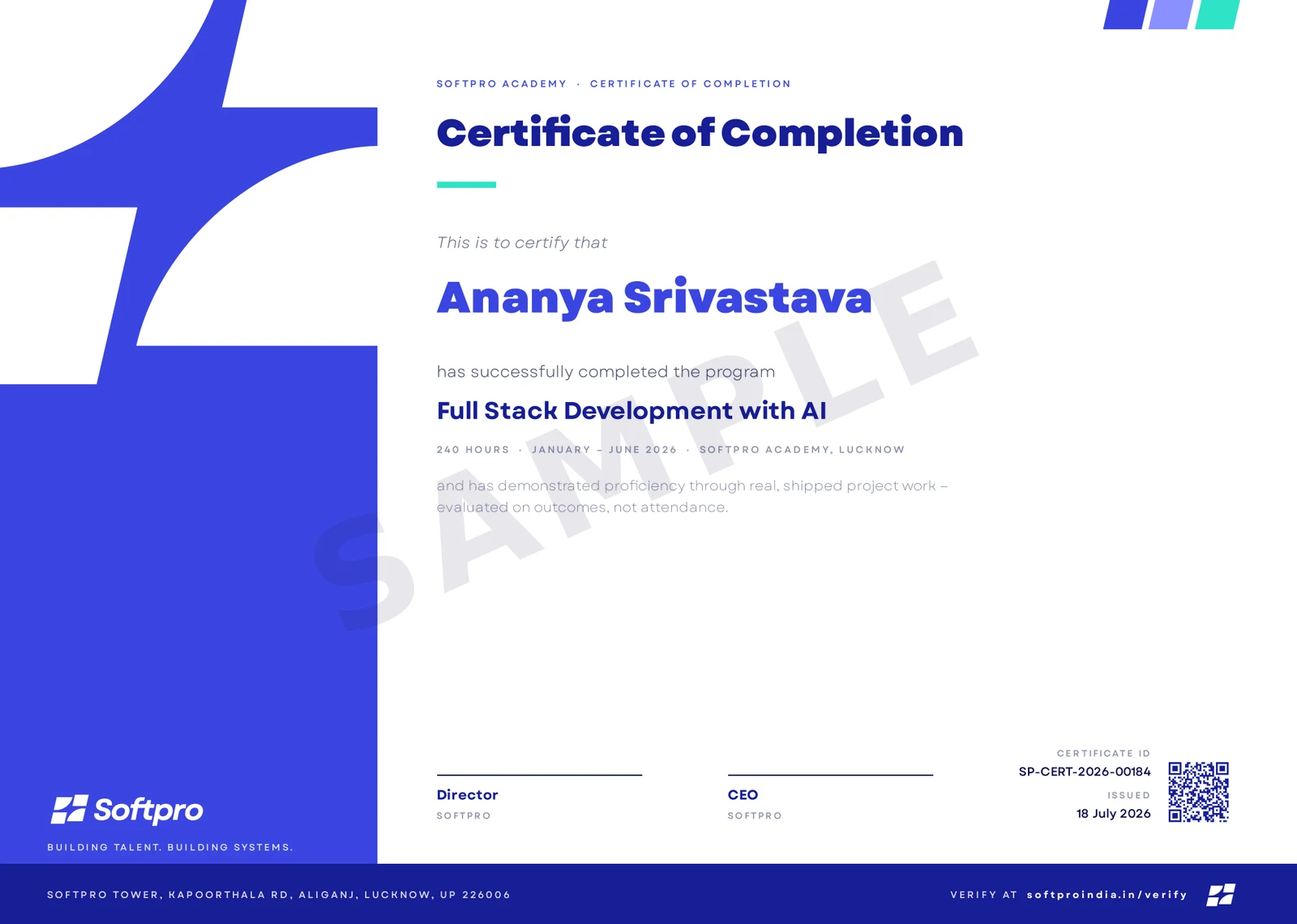
- Issued on program completion, with your name, course and grade.
- Carries a unique certificate ID and QR code.
- Anyone can confirm it in seconds on ourcertificate verification page — recruiters included.
A practice-first summer-training course that takes you from the web foundation to shipping a full-stack Django application. You start with HTML, CSS, JavaScript, and Bootstrap, then learn Python properly and build real Django apps: models and the ORM, templates, forms, authentication, the admin, signals and caching, and REST APIs with Django REST Framework. You finish with payments, testing, deployment, and a complete e-commerce capstone. Every module ends in something you build and a checkpoint that proves you learned it.
Upcoming cohorts
New cohort dates are announced regularly — send an enquiry and we'll reserve you a seat in the next one.
Related courses
Course · Web Development
CSS
Master CSS from your first stylesheet to interview-grade, production-ready styling — the cascade and specificity, Flexbox and Grid, responsive and container-driven design, animatio
- Foundation
- ~19 hours
- Self-Paced
- Self-paced — start anytime
Course · Web Development
HTML
Master HTML properly — from how the browser parses markup into the DOM to semantic structure, accessible forms, multimedia, SEO, and structured data. HTML only, done the way real t
- Foundation
- ~15 hours
- Self-Paced
- Self-paced — start anytime
Course · Web Development
JavaScript
Go from your first variable to genuinely advanced, interview-grade vanilla JavaScript — the language internals, the DOM, modern ES2015+ syntax, OOP, asynchronous JS, and modules/to
- Foundation
- ~27 hours
- Self-Paced
- Self-paced — start anytime