







What you'll be able to do
- Call LLM APIs and write async Python that runs LLM calls concurrently and streams responses
- Engineer prompts and force validated, structured (Pydantic) outputs from models
- Build RAG systems with embeddings, ChromaDB / pgvector, chunking, and re-ranking
- Master LangChain and LangGraph to build stateful, multi-step, multi-agent systems
- Integrate tools and data into agents with MCP (Model Context Protocol)
- Serve agents as production APIs with FastAPI, containerize with Docker, and deploy to the cloud
- Apply production AI engineering: evaluation, observability/tracing, and reliability
Before you start
- Comfortable with core Python (the Python Power-Up week or equivalent)
- A laptop that can run Python 3.12, Docker, and a local model via Ollama
- Free accounts: GitHub, Google AI Studio (Gemini), Groq, Hugging Face, Supabase
- Willingness to ship deployed projects through the cohort
Tools & technologies
The syllabus
Day 1 — API & HTTP Foundations + Dev Environment
Talk to any web API, set up the AI dev environment, and make your first Gemini call.
- HTTP & REST: How the Web Talks
- JSON: The Language of APIs
- Making Requests with requests
- Async-Ready HTTP with httpx
- API Keys, Headers & Auth Tokens
- Dev Environment: uv, venv & Project Layout
- Secrets with .env and python-dotenv
- Your First Gemini API Call
- Lab: CLI Public-API Fetcher
- Lab: CLI Gemini Q&A Tool
- Day 1 Checkpoint
- Day 1 Assignment: HTTP & First API
Day 2 — Async Python for AI
Run many LLM calls concurrently and stream responses.
- Why Async? Blocking vs Non-Blocking
- async / await and Coroutines
- The asyncio Event Loop
- Concurrent Calls with asyncio.gather
- Async HTTP with httpx.AsyncClient
- Streaming Responses
- Timeouts, Cancellation & Async Errors
- Lab: Fan-Out LLM Calls Concurrently
- Lab: Streaming Token Printer
- Day 2 Checkpoint
- Day 2 Assignment: Concurrent API Client
Day 3 — Pydantic & Structured Data
Model and validate the data every AI app moves around with Pydantic.
- Type Hints Refresher
- Pydantic Models & Fields
- Validation & Custom Validators
- Nested Models & Lists
- Settings with pydantic-settings
- Serialization: model_dump & JSON
- Lab: Model an API Response
- Lab: Typed App Config
- Day 3 Checkpoint
- Day 3 Assignment: Data Modeling
Day 4 — How LLMs Work
Build accurate intuition for tokens, context windows, sampling, and cost.
- What Is an LLM? Transformer Intuition
- Tokens & Tokenization
- Context Windows & Limits
- Temperature, Top-p & Sampling
- Model Families & Capabilities
- Hosted vs Local; Cost & Latency
- Lab: Tokenizer Explorer
- Lab: Temperature & Sampling Experiments
- Day 4 Checkpoint
Day 5 — Prompt Engineering
Get reliable behavior from a model with structured prompts.
- Anatomy of a Prompt: System vs User
- Zero-Shot & Few-Shot Prompting
- Chain-of-Thought & Reasoning Prompts
- Structure, Delimiters & Roles
- Iterating & Optimizing Prompts
- Lab: Prompt A/B Comparison
- Lab: Build a Prompt Template Library
- Day 5 Checkpoint
- Day 5 Assignment: Prompt Engineering
Day 6 — Structured Outputs & Validation
Force the model to return validated, structured data your code can trust.
- Why Structured Outputs Matter
- JSON Mode & Response Schemas
- Pydantic + LLM: Validated Outputs
- Parsing & Repairing Model Output
- Retry & Fallback on Invalid Output
- Lab: Resume Parser to Pydantic
- Lab: Structured Data Extractor
- Day 6 Checkpoint
- Day 6 Assignment: Structured Extraction
Day 7 — Multi-Provider AI Architecture
Swap models and providers behind one clean interface.
- The Provider Landscape: Gemini, Groq, HF, Ollama
- Calling Gemini
- Calling Groq (Fast Inference)
- Local Models with Ollama
- Hugging Face Inference
- A Provider Abstraction Layer
- Fallbacks & Routing
- Lab: Unified Multi-Provider Client
- Lab: Provider-Switching Playground
- Day 7 Checkpoint
- Day 7 Assignment: Provider Abstraction
Day 8 — Streamlit + External Data
Put a UI on an AI app with Streamlit and feed it real documents.
- Streamlit Fundamentals
- Widgets & User Input
- Session State
- File Uploads
- Extracting Text from PDFs
- CSV & Web Scraping with BeautifulSoup
- Lab: AI Document-Chat UI
- Lab: Multi-Format Loader
- Day 8 Checkpoint
Day 9 — Reliability Engineering
Make AI calls production-safe: retries, rate limits, logging, streaming.
- Error Handling for API Calls
- Retries & Exponential Backoff
- Rate Limiting & Throttling
- Logging & Observability Basics
- Streaming Responses to the UI
- Tracking Tokens & Cost
- Lab: A Reliable LLM Wrapper
- Day 9 Checkpoint
- Mini Project 1 — Kickoff & Spec
Day 10 — Mini Project 1: Build + Deploy
Build and deploy Mini Project 1 — the AI Content Intelligence System.
- Project Brief: AI Content Intelligence System
- Architecture & Build Plan
- Deploying to Streamlit Cloud / HF Spaces
- Environment Variables in Production
- Writing a Good README + Demo Video
- Lab: Build & Ship Mini Project 1
Day 11 — Embeddings + Semantic Search from Scratch
Understand embeddings by building semantic search from scratch.
- What Are Embeddings?
- Embedding Models & Dimensions
- Generating Embeddings (Gemini / Local)
- Cosine Similarity & Vector Math
- Building Semantic Search by Hand
- Lab: Embed & Search a Document Set
- Lab: Similarity Scorer
- Day 11 Checkpoint
- Day 11 Assignment: Semantic Search
Day 12 — Vector Databases: ChromaDB
Store and query vectors locally with ChromaDB.
- Why a Vector Database?
- ChromaDB Architecture & Collections
- Adding Documents & Metadata
- Querying & Persistence
- Lab: Local Vector Store with Chroma
- Lab: Metadata-Filtered Search
- Day 12 Checkpoint
Day 13 — Cloud Vector Infra: pgvector + Supabase
Run vector search on a real cloud database with pgvector + Supabase.
- Postgres + pgvector Basics
- Setting Up Supabase
- Schema Design for Vectors + Metadata
- Querying pgvector
- Lab: Deploy a Vector DB to Supabase
- Day 13 Checkpoint
Day 14 — Chunking Strategies
Chunk documents so retrieval finds the right context.
- Why Chunking Decides RAG Quality
- Fixed-Size & Overlap Chunking
- Recursive & Structure-Aware Chunking
- Semantic Chunking
- Parent-Document Retrieval
- Lab: Chunking Comparison Harness
- Day 14 Checkpoint
- Day 14 Assignment: Chunking
Day 15 — Retrieval + Re-ranking
Improve answer quality with hybrid retrieval and re-ranking.
- k-NN Retrieval
- Keyword Search & BM25
- Hybrid Retrieval
- Metadata Filtering
- Cross-Encoder Re-ranking
- Context Compression
- Lab: Hybrid Retrieval + Re-ranker
- Day 15 Checkpoint
Day 16 — RAG Frameworks: LlamaIndex
Assemble and evaluate a real RAG pipeline with LlamaIndex.
- LlamaIndex Architecture
- Document Loaders
- Indexes & Query Engines
- RAG Evaluation: Faithfulness & Relevance
- Lab: Full RAG Pipeline with LlamaIndex
- Lab: Evaluate Your RAG
- Day 16 Checkpoint
- Day 16 Assignment: RAG Pipeline
Day 17 — Mini Project 2: Build + Deploy
Build and deploy Mini Project 2 — the AI Document Intelligence Platform.
- Project Brief: AI Document Intelligence Platform
- Architecture & Source Citations
- Persistent Memory & Conversation History
- Deploy + Document
- Lab: Build & Ship Mini Project 2
Day 18 — Agent Foundations: Tool Calling from Scratch
Build a tool-calling agent loop from scratch to see what frameworks automate.
- What Is an Agent?
- Function / Tool Calling Explained
- The Agent Loop
- ReAct: Reason + Act
- Parsing Tool Calls & Feeding Results Back
- Lab: Hand-Built Tool-Calling Agent
- Lab: Calculator + Web-Search Agent
- Day 18 Checkpoint
- Day 18 Assignment: Build an Agent Loop
Day 19 — LangChain I: Core
Compose LLM pipelines with LangChain and LCEL.
- LangChain Overview & Ecosystem
- Models, Prompts & Output Parsers
- LCEL: The Runnable Interface
- Composing Chains with Pipe
- Streaming & Batching
- Lab: Build LCEL Chains
- Day 19 Checkpoint
Day 20 — LangChain II: Data & Memory
Add memory and retrieval to LangChain apps.
- Document Loaders & Splitters
- Retrievers & Vector Store Integration
- Building a Retrieval Chain (RAG)
- Conversation Memory
- Callbacks & Tracing Hooks
- Lab: Conversational RAG in LangChain
- Day 20 Checkpoint
- Day 20 Assignment: LangChain RAG
Day 21 — LangChain III: Tools & Agents
Give LangChain agents real tools.
- Defining Tools
- Tool Calling & Structured Tools
- Agent Executors
- Building a Multi-Tool Agent
- Debugging Agent Runs
- Lab: Multi-Tool LangChain Agent
- Day 21 Checkpoint
- Day 21 Assignment: Tool Agent
Day 22 — LangGraph I: State Graphs
Model agent workflows as explicit graphs with LangGraph.
- Why Graphs for Agents?
- State, Nodes & Edges
- Building Your First Graph
- Conditional Edges & Routing
- Managing Graph State
- Lab: A Routing State Machine
- Day 22 Checkpoint
Day 23 — LangGraph II: Agentic Loops
Build a real ReAct agent in LangGraph.
- The ReAct Agent in LangGraph
- Tool Nodes
- Cycles & Loop Control
- Prebuilt Agents (create_react_agent)
- Lab: Tool-Using ReAct Agent
- Day 23 Checkpoint
- Day 23 Assignment: LangGraph Agent
Day 24 — LangGraph III: Persistence & Memory
Make LangGraph agents durable and human-supervised.
- Checkpointers & Durable State
- Threads & Conversation Memory
- Human-in-the-Loop & Interrupts
- Streaming Graph Output
- Time Travel & Replay
- Lab: Agent with Checkpointing + Approval
- Day 24 Checkpoint
Day 25 — LangGraph IV: Multi-Agent
Orchestrate multiple agents within LangGraph.
- Multi-Agent Patterns Overview
- Supervisor Architecture
- Hierarchical Teams
- Subgraphs & Handoffs
- Lab: Supervisor Multi-Agent System
- Day 25 Checkpoint
- Day 25 Assignment: Multi-Agent System
Day 26 — MCP + LangGraph
Wire tools and data into agents via MCP (Model Context Protocol).
- What Is MCP & Why It Exists
- MCP Architecture: Servers, Clients, Tools, Resources
- Using Existing MCP Servers
- Building Your Own MCP Server
- Connecting MCP to LangGraph (langchain-mcp-adapters)
- Lab: Custom MCP Server + LangGraph Agent
- Day 26 Checkpoint
- Day 26 Assignment: MCP Tool Server
Day 27 — Observability + Security
See inside agents with tracing and make them safe with guardrails.
- Why Observability for Agents
- Tracing with LangSmith / Langfuse
- Evals & Prompt Versioning
- Debugging Agent Failures
- Prompt Injection & Attacks
- Guardrails & Output Validation
- Lab: Trace & Guard an Agent
- Day 27 Checkpoint
Day 28 — Frameworks Landscape (Survey)
Survey the rest of the agent ecosystem and know when to reach for it.
- CrewAI: Role-Based Crews
- AutoGen: Conversational Agents
- OpenAI Agents SDK
- LlamaIndex Agents
- Choosing the Right Framework
- Lab: Same Task, Three Frameworks
- Day 28 Checkpoint
Day 29 — Mini Project 3: Build + Deploy
Build and deploy Mini Project 3 — an autonomous LangGraph research agent.
- Project Brief: Autonomous Research Agent
- Architecture: LangGraph + MCP Tools
- Adding Tracing & Memory
- Deploy to the Cloud
- Lab: Build & Ship Mini Project 3
Day 30 — FastAPI Fundamentals
Serve a LangGraph agent as a real API with FastAPI.
- FastAPI Overview & ASGI
- Path & Query Parameters
- Pydantic Request / Response Models
- Async Endpoints
- Serving a LangGraph Agent
- Lab: Wrap Your Agent in FastAPI
- Day 30 Checkpoint
Day 31 — FastAPI Advanced
Stream and scale the API with SSE, WebSockets, and auth.
- Streaming Responses (SSE)
- WebSockets for Chat
- Background Tasks
- Auth Basics & API Keys
- CORS & Error Handling
- Lab: Streaming Chat API
- Day 31 Checkpoint
- Day 31 Assignment: Agent API
Day 32 — Product Frontends
Build a real frontend on the backend with Streamlit / Gradio.
- Advanced Streamlit Patterns
- Gradio for AI UIs
- State Management in the Frontend
- Wiring Frontend to a FastAPI Backend
- Lab: Full-Stack AI App
- Day 32 Checkpoint
Day 33 — Docker + Deployment / DevOps
Containerize and deploy the product with Docker and CI/CD.
- Docker Basics for Python Apps
- Writing a Dockerfile
- Environment & Secrets Management
- Deploying to Render / Railway
- CI/CD with GitHub Actions
- Lab: Containerize & Deploy
- Day 33 Checkpoint
- Day 33 Assignment: Deploy a Containerized App
Day 34 — Evaluation & Reliability
Measure and harden AI quality with evals and LLM-as-judge.
- Why AI Systems Need Evals
- Hallucination Detection
- Building Evaluation Pipelines
- LLM-as-Judge
- Prompt & Regression Testing
- Cost & Latency Optimization
- Lab: Build an Eval Pipeline
- Day 34 Checkpoint
Day 35 — Production Monitoring
Watch a live AI system with logging, tracing, and monitoring.
- Logging & Structured Logs
- Tracing in Production
- Prompt Versioning & Rollback
- Reliability Metrics & Alerts
- Lab: Monitoring Dashboard
- Day 35 Checkpoint
Day 36 — Capstone Kickoff
Scope and architect your capstone.
- The 6 Capstone Tracks
- Scoping Your Project
- Designing the Agent Architecture
- Planning Tools, Data & Deployment
- Lab: Write Your Architecture Doc
Day 37 — Capstone Build + Deploy
Build and ship the capstone.
- Build Plan & Milestones
- Implementing the Agent Core
- Serving, Deploying & Tracing
- Lab: Build & Deploy the Capstone
Day 38 — Demo Day + Placement Prep
Present your work and get placement-ready.
- Demoing Your Project
- AI-Focused Resume
- GitHub Portfolio & READMEs
- LinkedIn Optimization
- Mock Interview: AI Engineering Questions
- Lab: Capstone Demo + Resume Review
Capstone — Production Agentic AI Product
Choose one capstone track and ship it as a production-grade, deployed product built on the stack you mastered (LangChain / LangGraph + FastAPI, with RAG and/or MCP tools as the track needs).
How you'll learn
This course's public GitHub repo is shared when the next cohort opens —ask us for a preview and we'll send you the link.
The certificate you'll earn
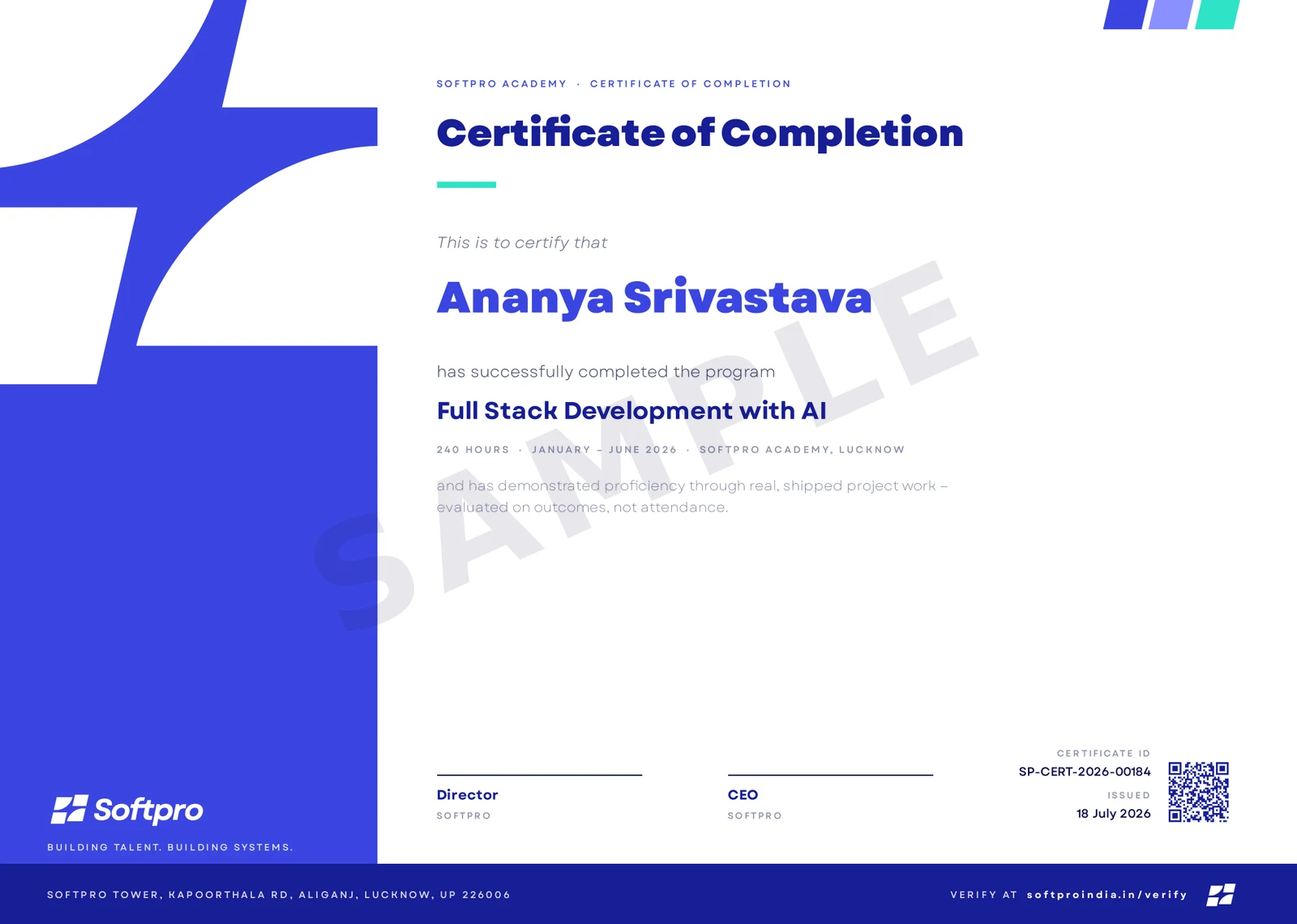
- Issued on program completion, with your name, course and grade.
- Carries a unique certificate ID and QR code.
- Anyone can confirm it in seconds on ourcertificate verification page — recruiters included.
A practice-first, project-driven offline cohort that turns Python developers into production-ready AI engineers. You start by filling the engineering gaps the Python week left — API calls, async, and Pydantic — then build LLM apps across multiple providers (Gemini, Groq, Ollama, Hugging Face). You go deep on RAG with embeddings, vector databases (ChromaDB, pgvector/Supabase), chunking, and re-ranking, then master the modern agent stack — LangChain and LangGraph — integrating tools and data via MCP. Finally you serve agents as real products with FastAPI, Docker, and cloud deployment, and learn production AI engineering: evaluation, observability, and reliability. Three deployed mini projects and a deployed capstone. Free-tier-first: no paid OpenAI key required.
Upcoming cohorts
New cohort dates are announced regularly — send an enquiry and we'll reserve you a seat in the next one.