







What you'll be able to do
- Read circuits and program microcontrollers in embedded C
- Interface sensors, motors, and displays with Arduino
- Assemble and program a working robot
- Connect devices to the cloud with ESP32, Wi-Fi, and MQTT
- Build a complete IoT device with a live dashboard as your capstone
Before you start
- No electronics background needed — the course starts from fundamentals
- A laptop that can run the Arduino IDE
- Willingness to practice daily through the cohort
Tools & technologies
The syllabus
Introduction to Embedded Systems
Understand basic embedded systems
- Embedded System definition, characteristics, applications, embedded vs general-purpose computer, real-time systems
- Identify Arduino Uno, ESP32, Raspberry Pi, sensors and components
- Prepare an Embedded System block diagram
Microcontroller & Microprocessor
Select suitable controller for a project
- MCU, MPU, CPU, RAM, ROM, Flash, GPIO, ADC, PWM, timers
- Compare Arduino Uno, ESP32 and Raspberry Pi
- Prepare comparison table
Basic Electronics
Perform basic electrical measurements
- Voltage, current, resistance, power, Ohm's law, series and parallel circuits
- Use multimeter; measure voltage, resistance and continuity
- Calculate resistance using Ohm's law
Electronic Components
Understand basic components
- Resistor, capacitor, diode, LED, transistor, relay, switch, buzzer
- Identify components and build LED, buzzer and switch circuits
- Build LED ON/OFF circuit
Sensors and Actuators
Understand sensors and actuators
- Digital/analog sensors, temperature, light, motion, distance; actuators
- Identify and test IR, ultrasonic, PIR, LDR, DHT11, soil moisture, MQ-2, servo, motor, relay, buzzer
- Prepare sensor/actuator classification
Arduino Introduction
Set up Arduino development environment
- Arduino Uno architecture, digital/analog pins, power pins, USB, ATmega328P
- Identify Arduino Uno, install Arduino IDE, connect board
- Upload first Arduino program
Arduino Programming Basics
Understand Arduino Embedded C/C++ basics
- Arduino sketch, setup(), loop(), variables, data types, constants, operators
- Write basic Arduino programs
- Create addition, subtraction, multiplication and division programs
Conditional Statements & Loops
Use programming logic
- if, if-else, nested conditions, for, while, do-while
- LED control using conditions and loops
- Create conditional LED control
Digital Input & Output
Control digital devices
- Digital input/output, digitalRead(), digitalWrite(), push button, LED
- LED blinking, push button, multiple LEDs, toggle switch
- Build push-button LED control
Analog Input & PWM
Use analog sensors and PWM
- Analog input, ADC, PWM, analogRead(), analogWrite()
- LDR, potentiometer and LED brightness control
- Control LED brightness using potentiometer
Serial Communication
Use serial communication
- UART, Serial Monitor, baud rate, TX/RX
- Print sensor values and receive commands
- Control LED using Serial Monitor
Functions & Modular Programming
Write modular Arduino programs
- Functions, parameters, return values, code reuse, modular programming
- Create functions for LED, buzzer, motor and sensor
- Build menu-based serial program
Servo Motor
Control servo actuators
- Servo motor, SG90, servo angle, PWM, Servo library
- Control servo at 0°, 45°, 90° and 180°; potentiometer control
- Control servo using potentiometer
Ultrasonic Sensor
Measure distance and detect objects
- HC-SR04, trigger, echo, distance measurement, time-of-flight
- Measure distance and detect objects
- Create ultrasonic distance meter
IR, PIR & LDR Sensors
Integrate multiple sensors
- IR object detection, PIR motion detection, LDR analog sensing
- Object detection, motion detection and automatic lighting
- Create motion detection alarm
LCD Display
Display real-time sensor information
- 16x2 LCD, I2C LCD, SDA, SCL, LCD library
- Display text, sensor values, distance and status
- Build digital sensor monitor
DC Motor & L298N
Control DC motors
- DC motor, gear motor, L298N, direction and PWM speed control
- Forward, reverse, stop and speed control
- Build motor-control circuit
Relay & Appliance Control
Implement basic automation
- Relay, NO, NC, COM, isolation, appliance control concepts
- Relay ON/OFF with Arduino
- Build automatic switching system
Communication Protocols
Use hardware communication protocols
- UART, I2C, SPI, master/slave, sensor communication
- I2C LCD, I2C sensor, SPI device, UART communication
- Connect multiple devices using I2C
Arduino Mini Project
Complete an Arduino mini project
- Requirement analysis, block diagram, circuit, programming, testing
- Develop Smart Dustbin, Smart Parking, Automatic Gate, Smart Street Light or Temperature Monitor
- Complete mini project
ESP32 Introduction
Understand ESP32 platform
- ESP32 architecture, GPIO, ADC, PWM, Wi-Fi, Bluetooth, touch sensor
- ESP32 setup, GPIO and LED control
- Create ESP32 LED control
ESP32 Programming
Program ESP32 for embedded applications
- GPIO, ADC, PWM, Serial, functions, sensor interface
- LED, button, LDR and servo with ESP32
- Build ESP32 sensor system
ESP32 Wi-Fi
Connect embedded device to network
- Wi-Fi, SSID, password, IP address, client, access point
- Connect ESP32 to Wi-Fi and scan networks
- Create ESP32 Wi-Fi connection
ESP32 Web Server
Build basic web-enabled IoT device
- Web server, HTTP, HTML, IP address, GET request
- ESP32 web server, web LED control and sensor display
- Control LED from mobile browser
MicroPython Introduction
Set up MicroPython development
- Python vs MicroPython, MicroPython firmware, Thonny IDE, REPL
- Install MicroPython, flash ESP32, connect Thonny, run first program
- ESP32 LED blinking using MicroPython
MicroPython Programming
Program ESP32 using MicroPython
- Variables, data types, conditions, loops, functions, modules
- LED, button, buzzer and conditional control
- Build button-based automation
MicroPython Sensors & PWM
Interface sensors and actuators in MicroPython
- GPIO, PWM, ADC, sensor reading, servo
- LDR, potentiometer, servo and buzzer
- Control servo based on sensor value
MicroPython I2C & UART
Use MicroPython communication interfaces
- I2C, UART, SPI, LCD, sensor modules
- I2C LCD, UART communication and sensor display
- Create I2C sensor monitor
Internet of Things
Understand IoT architecture
- IoT definition, architecture, device/network/cloud/application layers
- Connect ESP32 to Internet
- Draw complete IoT architecture
MQTT & HTTP
Use IoT communication protocols
- MQTT, HTTP, broker, publisher, subscriber, topics, REST API
- MQTT publish/subscribe and HTTP request
- Send sensor data using MQTT
IoT Cloud & Dashboard
Monitor data remotely
- Cloud platform, dashboard, data logging, remote monitoring and device control
- Create dashboard and send ESP32 sensor data
- Create remote monitoring system
IoT Remote Control
Implement remote IoT control
- Remote device control, digital control, sensor monitoring, mobile/web control
- Remote LED, relay, fan and servo control
- Control three devices remotely
IoT Automation & Alerts
Implement event-based IoT automation
- Automation rules, thresholds, notifications, event detection, data logging
- Temperature, motion and gas alerts; threshold automation
- Build automatic alert system
IoT Security
Understand basic IoT security
- Authentication, passwords, API keys, secure communication, device security, data privacy
- Basic secure device access and authentication concepts
- Create secure access demonstration
IoT Mini Project
Build an integrated IoT project
- Hardware, software, cloud, dashboard and testing
- Smart Home, Smart Agriculture, Weather Monitoring, Energy Meter or IoT Security System
- Complete IoT mini project
Raspberry Pi Introduction
Set up Raspberry Pi
- Raspberry Pi architecture, Raspberry Pi OS, GPIO, USB, HDMI, networking, storage
- Install/configure Raspberry Pi OS, network and GPIO
- GPIO test
Linux & Python on Raspberry Pi
Program Raspberry Pi with Python
- Linux commands, terminal, Python, GPIO, libraries, file system
- Python LED, button, buzzer and relay control
- Create Python GPIO automation
Raspberry Pi Sensors & Motors
Interface sensors and motors
- Sensors, motor driver, DC motor, servo, ultrasonic, IR
- Ultrasonic, motor driver, servo and sensor reading
- Create Raspberry Pi motor-control system
Robotics Fundamentals
Understand robot architecture
- Robot types, architecture, sensors, actuators, motors, controllers, power supply
- Assemble robot chassis, motors and sensors
- Prepare complete robot block diagram
Obstacle Avoiding Robot
Build autonomous obstacle-avoiding robot
- Ultrasonic sensing, motor driver, navigation, obstacle detection, decision making
- Build obstacle-avoiding robot with forward, stop, left, right and reverse
- Implement obstacle avoidance
Line Following Robot
Build basic autonomous line follower
- IR sensors, line detection, motor control, navigation algorithm
- Build line-following robot
- Configure left/right sensors and motors
Raspberry Pi Robotics
Integrate Raspberry Pi into robotics
- Raspberry Pi robot, Python motor control, multiple sensors, autonomous navigation, wireless control
- Build Raspberry Pi robot and control with Python
- Implement autonomous obstacle avoidance
Camera & Intelligent Robotics
Understand intelligent/vision-based robotics
- Pi Camera, OpenCV, image processing, object detection, human detection, computer vision basics
- Camera capture, image processing and basic object detection
- Use camera input for robot decision-making
Final Project Integration
Integrate complete project
- Requirement analysis, hardware/software integration, debugging, testing, documentation
- Assemble hardware, upload code, connect sensors, test communication, debug and integrate
- Complete final project integration
Final Demonstration & Evaluation
Demonstrate and defend final project
- Project presentation, viva, documentation, results, applications, future scope
- Final hardware/software demonstration and viva
- Demonstrate complete project
Final Project: Embedded, IoT & Robotics System
A complete hardware build carried through the ten project phases — requirement analysis, block diagram, component selection, circuit design, programming, assembly, integration, testing, documentation, and a live demonstration with viva — integrating embedded hardware, IoT connectivity, and robotics modules.
How you'll learn
This course's public GitHub repo is shared when the next cohort opens —ask us for a preview and we'll send you the link.
The certificate you'll earn
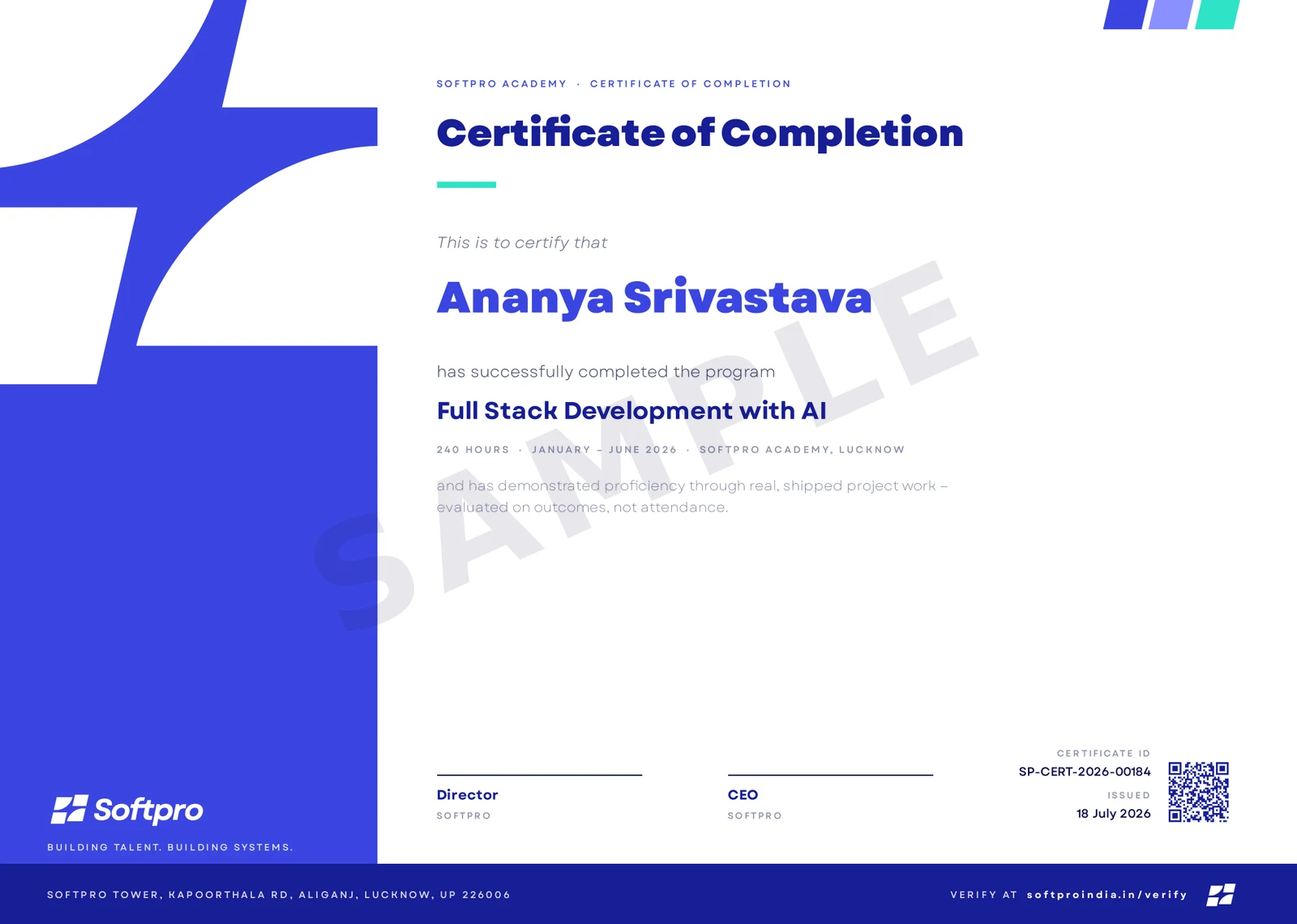
- Issued on program completion, with your name, course and grade.
- Carries a unique certificate ID and QR code.
- Anyone can confirm it in seconds on ourcertificate verification page — recruiters included.
A hands-on course where every concept ends as a working circuit. You start with electronics fundamentals and C programming for microcontrollers, then build up through Arduino — reading sensors, driving motors and displays, and assembling a working robot. From there you go connected: the ESP32, Wi-Fi, MQTT, and a live IoT dashboard, finishing with a capstone device that senses, decides, and reports to the cloud. You leave with hardware you built and the skills to design your own.
Upcoming cohorts
New cohort dates are announced regularly — send an enquiry and we'll reserve you a seat in the next one.